
ADAPTATEUR USB BLUETOOTH™-100 MÈTRES #F8T012FR - Bluetooth Adapter BELKIN - Free user manual and instructions
Find the device manual for free ADAPTATEUR USB BLUETOOTH™-100 MÈTRES #F8T012FR BELKIN in PDF.


| Product Type | Bluetooth USB Adapter |
| Brand | BELKIN |
| Model | F8T012FR |
| Bluetooth Version | 2.0 + EDR |
| Maximum Range | 100 meters (Class 1) |
| Data Rate | Up to 3 Mbps (actual throughput 2.2 Mbps) |
| Frequency | 2.4 to 2.4835 GHz |
| Physical Interface | USB 1.1/2.0 (compatible UHCI/OHCI) |
| Dimensions (L x W x H) | 58 x 18 x 8 mm |
| Weight | 7 g |
| Power Supply | Via USB port: 5 VDC, 100 mA nominal |
| Power Consumption (Tx/Rx) | Transmit: 150 mA, Receive: 80 mA |
| Compatible Operating Systems | Windows 98 SE, Me, 2000, XP; Mac OS X v10.3 and later |
| Minimum PC Requirements | 200 MHz processor, 64 MB RAM (128 MB recommended), free USB port |
| Minimum Mac Requirements | Free USB port, Mac OS X v10.3 or later |
| Network Topology | Point-to-Multipoint (1 master, multiple slaves) |
| Warranty | Manufacturer's Lifetime Warranty |
| Operating Temperature | 0 to 70 °C |
| Operating Humidity | 5 to 90% (non-condensing) |
| Package Contents | USB Adapter, CD-ROM (software + documentation), Quick Installation Guide, Registration Card |
| Safety Information | Protect against static electricity; do not touch the metal connector; discharge any static electricity before handling |
Frequently Asked Questions - ADAPTATEUR USB BLUETOOTH™-100 MÈTRES #F8T012FR BELKIN
User questions about ADAPTATEUR USB BLUETOOTH™-100 MÈTRES #F8T012FR BELKIN
0 question about this device. Answer the ones you know or ask your own.
Ask a new question about this device
Download the instructions for your Bluetooth Adapter in PDF format for free! Find your manual ADAPTATEUR USB BLUETOOTH™-100 MÈTRES #F8T012FR - BELKIN and take your electronic device back in hand. On this page are published all the documents necessary for the use of your device. ADAPTATEUR USB BLUETOOTH™-100 MÈTRES #F8T012FR by BELKIN.
USER MANUAL ADAPTATEUR USB BLUETOOTH™-100 MÈTRES #F8T012FR BELKIN
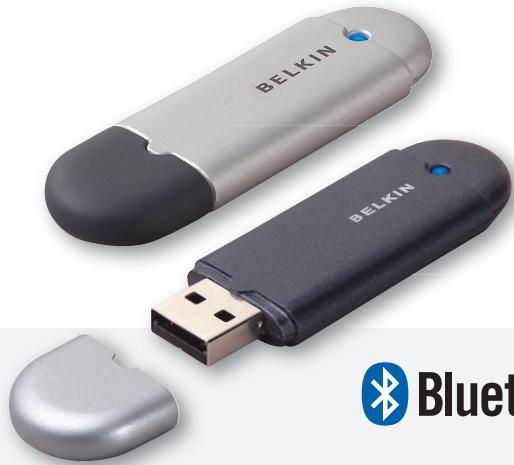
Connect your peripherals and computing devices, without cables

User Manual
Bluetooth
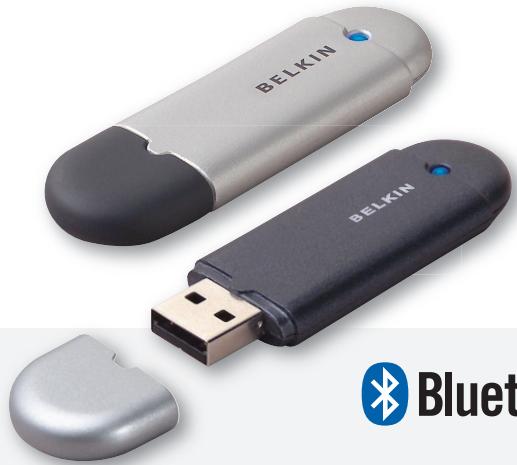
Connect your peripherals and computing devices, without cables

User Manual
Bluetooth

Table of Contents
Introduction 4
Product Features 5
System Requirements 6
Package Contents 7
USB Adapter Specifications. 8
Software Setup 9
Hardware Setup 16
Initial Configuration Wizard 19
Uninstalling the Software 22
How to use the Belkin Bluetooth software 26
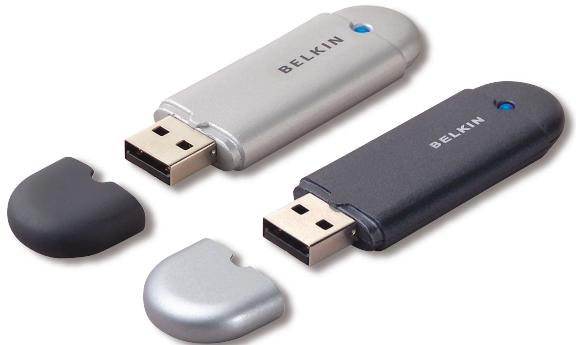
Thank you for purchasing the Bluetooth USB Adapter (the USB Adapter) from Belkin. The USB Adapter features breakthrough Bluetooth wireless technology that lets you create efficient communications between your USB desktop PC or notebook and devices using Bluetooth wireless technology—without physical connectors or cables.
Before you install and start using your new Bluetooth USB Adapter, please take a few minutes to review some of the terms that you will be seeing throughout the document.
UK-4
Product Features
- Bluetooth allows you to create an adhoc network
Higher speed access up to 3Mbps (effective throughput of 2.2 Mbps) - Adds Bluetooth 2.0 + EDR wireless technology to your USB desktop computer, or notebook
- Fast paring time between 3.5 to 5 sec.
Lower power consumption - Bit Error Rate (BER) improved performance
Manufacturer's Lifetime Warranty - Offers backwards compatibility with any Bluetooth v1.1 and v1.2-compliant device
- Installs easily with Plug-and-Play convenience
- Allows you to work at distances of up to 100 metres (Class 1) and 10 metres (Class 2)*
Supports Microsoft® Windows® 98 SE, Me, 2000, XP, and Mac OS® X v10.3 and higher
PC System Requirements
- PC-compatible computer, CPU speed of 200MHz or above
- Memory: 64MB or above, 128MB recommended
- One available USB port, USB 1.1 or 2.0
- Windows 98 SE, Me, 2000, and XP
Mac® System Requirements
One available USB port, USB 1.1 or 2.0
Mac OS X v10.3 and higher*
*Mac OS X driver and software provided by Apple.
Package Contents
- Bluetooth USB Adapter
- CD-ROM for installation software and documentation
- User Manual on CD
- Quick Installation Guide
- Registration Card
USB Adapter Specifications
Bluetooth Compliance: Version 2.0
Physical Interface: USB UHCI/OHCI 2.0-compliant
Operating Frequency: 2.4 to 2.4835GHz
Output Power: (F8T012) 4~20 dBm, Class I (F8T013) -6~4 dBm, Class II
Sensitivity: <0.1% BER @ -80 dBm
Data Rate: 3Mbps (effective throughput of 2.2 Mbps)
Typical Power
Consumption: (F8T012) Tx: 150mA, Rx 80mA (F8T013) Tx: 65mA, Rx 45mA
Operating Range: (F8T012) 100-meter radius indoors (F8T013) 10-meter radius indoors
Network Topology: Point-to-Multipoint
Packet Support: 1/3/5 Slots Packet
Operation: Master/Slave
Frequency Stability: +/- 10PPM
LED Indicator: Power On/Data Traffic
Antenna Type: Integrated, 0 + / - 1 dBi
Dimensions: 58mm (L) x 18mm (W) x 8mm (H)
Weight: 0.2oz. (7g)
Operating Temp: 0 to 70 degrees Celsius
Storage Temp: -30 to 80 degrees Celsius
Humidity: 5-90% (non-condensing)
Supply Voltage: 5.0V DC
Nominal Current: 100mA
Spread Spectrum: FHSS (Frequency Hopping) Spread Spectrum
Modulation: GFSK (Gaussian Frequency Shift Keying)
Certifications: FCC, CE, ICES, C-Tick, BQB, WHQL for XP
Specifications are subject to change without notice.
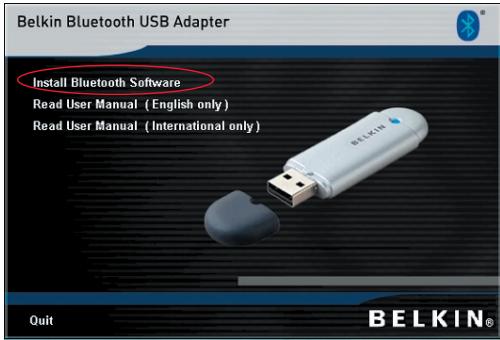
- Insert the CD and wait for the software to run automatically.
- Press on "Install Bluetooth Software".
Software Setup for Windows 98 SE, Me, 2000, and XP
To install the software for the USB Adapter, follow the instructions below:
Note: The installation process for Windows XP may look slightly different from Windows 98 SE, Me, and 2000.
Note: Do not insert the USB Adapter into the USB port prior to software installation.
- Insert the software installation CD-ROM into the PC's CD-ROM drive.
- The "Software InstallShield Wizard" window appears. Click on "Next" to begin the installation process.
-
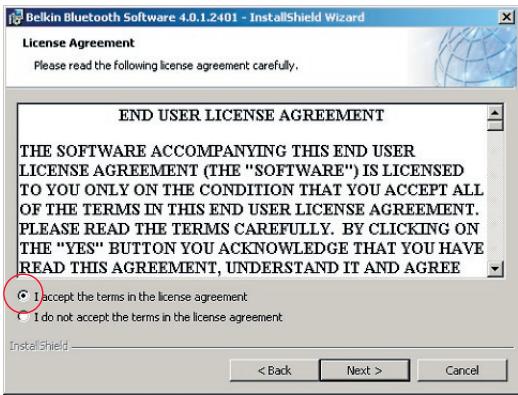
Choose "I accept the terms in the license agreement" to accept the license agreement. Click on "Next" to continue.
-
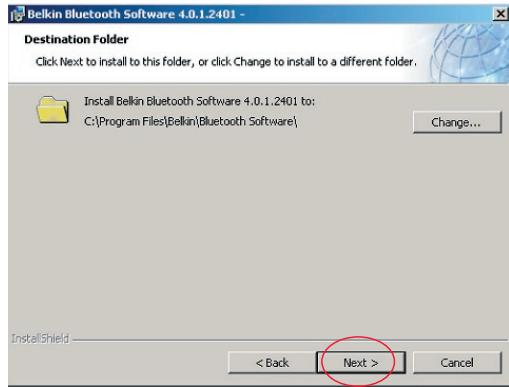
Specify the location where the software files will be installed on your hard drive. It is recommended that you install the software in the default directory "C:\Program Files\Belkin\Bluetooth Software". Click on "Next" to continue.
-
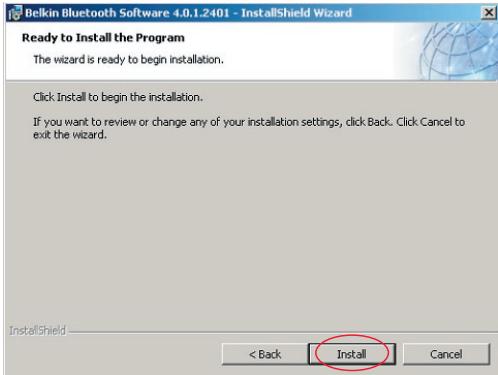
Confirm that the device software is ready to be installed and click on "Install".
-
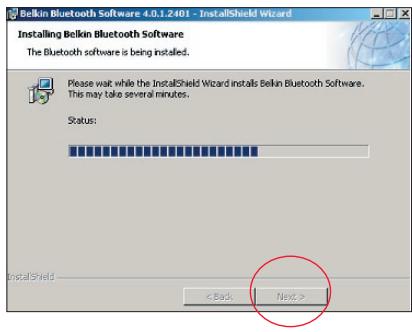
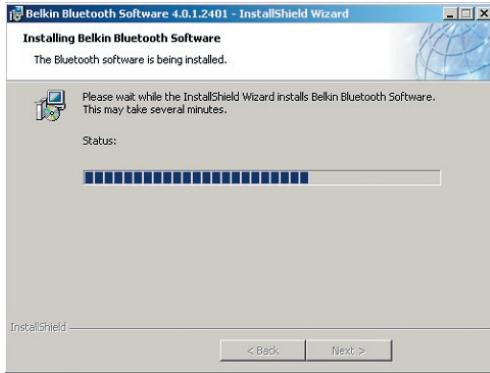
The InstallShield Wizard will begin to install the Belkin Bluetooth Software. This may take several minutes.
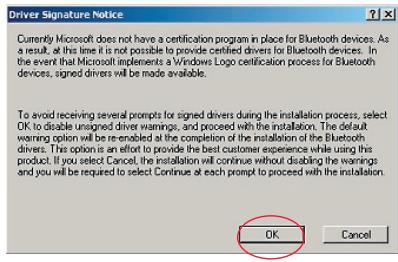
- The Driver Signature Notice window will appear. Press OK for the next step.
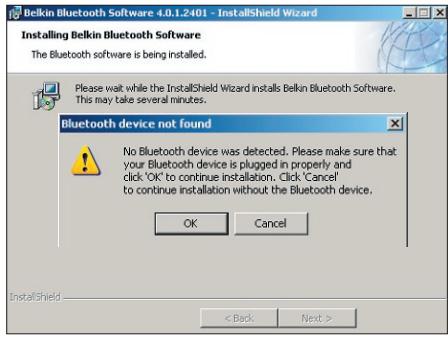
- During the installation process you may be prompted to insert your USB Adapter. If your USB Adapter is not plugged into your computer at this time, you may insert it into an available USB 1.1-compliant port on your desktop or notebook computer, then click "OK" to continue. Click on "Cancel" to continue installation without the Bluetooth device inserted. Refer to the "Hardware Installation" section of this User Manual for instructions for installing the hardware.
Note: If at any time during the installation process you receive a "Driver Signature Notice", click "OK" to continue the installation process.
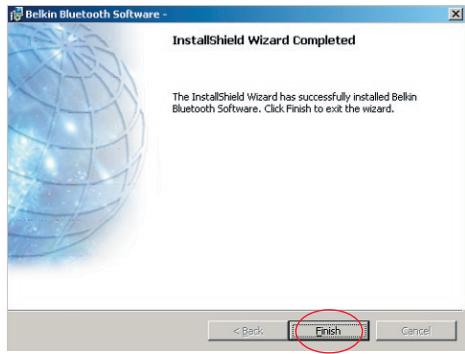
- Confirm the completion of the software installation; click "Finish" and restart the system if prompted to do so.
Hardware Setup for Windows 98 SE, Me, 2000, and XP
Follow these instructions to install your USB Adapter on your PC.
Note: Your USB Adapter is sensitive to static electricity, which can damage its delicate electrical components. To protect your device, always touch the metal chassis of your computer before handling the USB Adapter. This will ground any potential electrostatic discharge. Avoid touching the metal connector when handling the USB Adapter. Dry weather conditions or walking across carpeted floors may cause you to
acquire an electrostatic charge.
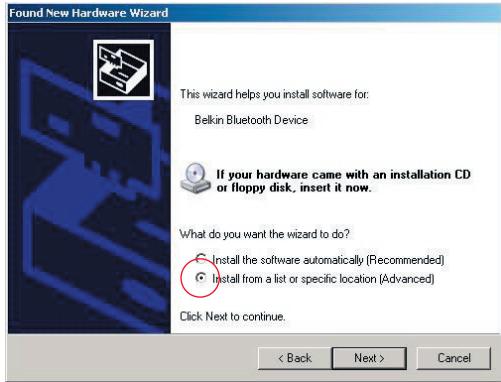
- Connect the USB Adapter directly to an available USB A-type connector on your desktop or notebook computer. Your system should register a new USB device found.
- Choose "Install from a list or specific location"; then click "Next".
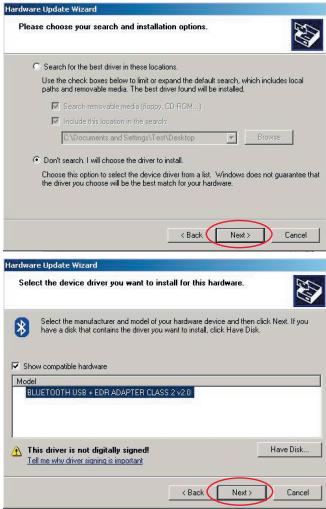
- Browse for the location of the device driver ":\Program Files\Belkin\Bluetooth\Software\bin" then click "Next".
- If you receive the following "Hardware installation notice", click on "Continue Anyway" to continue with the installation process.
Hardware Installation

The software you are installing has not passed Windows Logo testing to verify its compatibility with Windows XP. (Tell me why this testing is important.)
Continuing your installation of this software may impair or destabilize the correct operation of your system either immediately or in the future. Microsoft strongly recommends that you stop this installation now and contact the hardware vendor for software that has passed Windows Logo testing.
Continue Anyway
STOP Installation
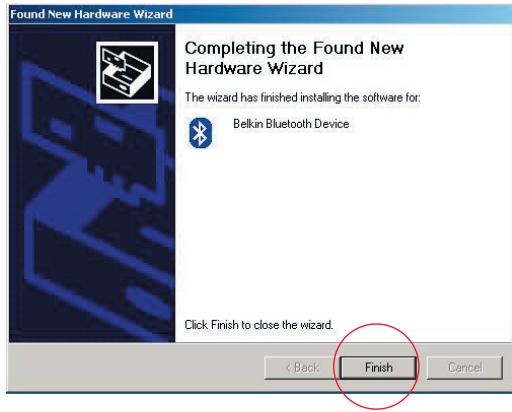
- A window will appear that confirms the completion of the hardware installation; click on "Finish" to complete the installation process.
Configuring your computer for Windows 98 SE, Me, 2000, and XP
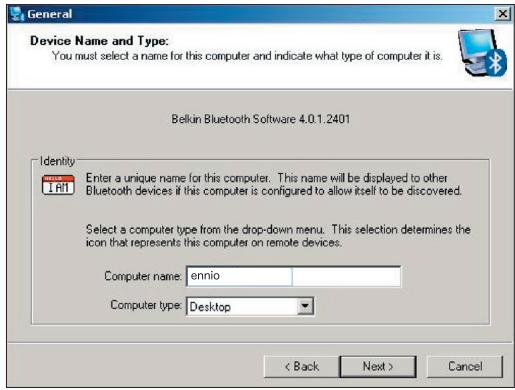
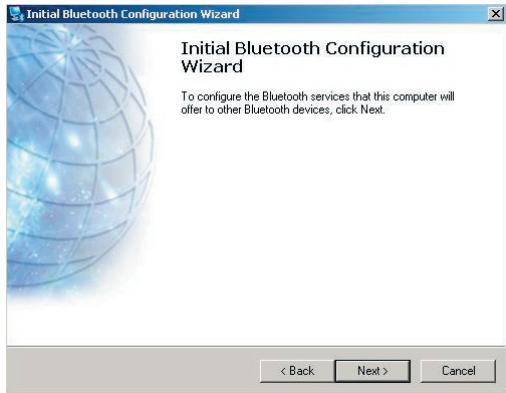
- Once the installation process is complete you will be prompted by the "Initial Bluetooth Configuration Wizard". This Wizard will guide you through the initial setup of your Bluetooth device. Please follow the Wizard as prompted.
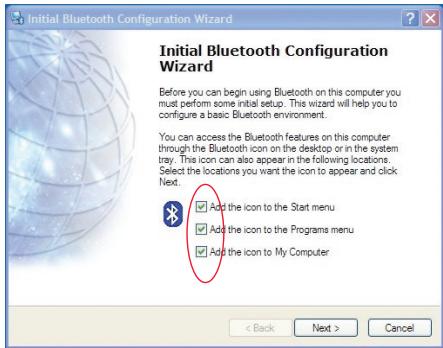
- Name your computer with a friendly name. This is the name, which will be made available when your computer is discovered by other Bluetooth devices.
Initial Configuration Wizard
-
Choose the type of computer on which you have installed the Belkin USB Adapter from the drop-down menu in the window.
-
Continue the Wizard to configure the Bluetooth services that this computer will make available for use to other Bluetooth devices. Click "Next".
-
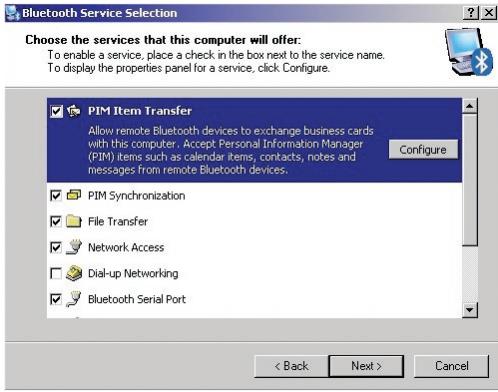
Choose the Bluetooth services that your computer will offer. The most common service for your computer type will be checked by default.
-
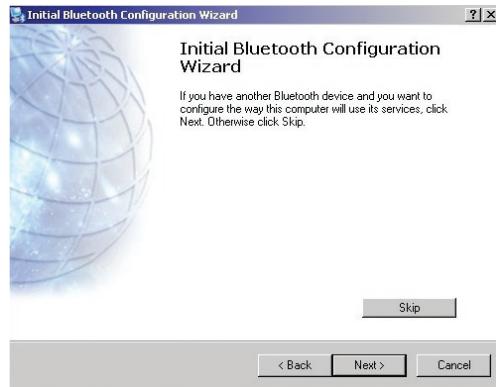
If you wish to configure another Bluetooth device on this computer, click "Next". Otherwise click "Skip".
Uninstalling the Software for Windows 98 SE, Me, 2000, and XP
Follow these instructions to uninstall your USB Adapter on your PC.
Go to your Taskbar and click Start.
Click on settings and go to control panel.
- In the Windows Control panel go to "Add and Remove programs"
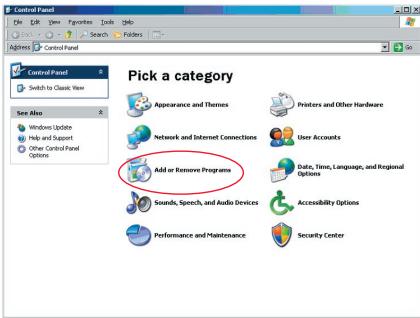
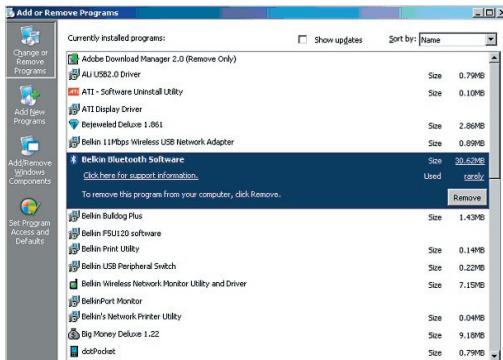
Uninstalling the Software
-
select 'Belkin Bluetooth Software' and press "Remove"
-
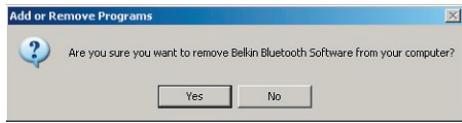
Press "Yes"
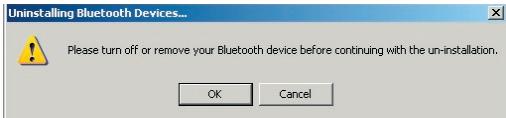
- When removing the software, the following Windows message appears 'Un-installing Bluetooth Devices...' press "OK".
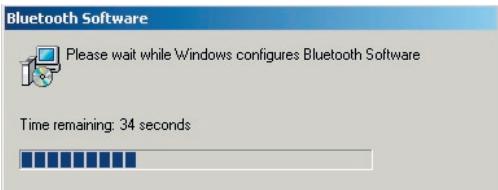
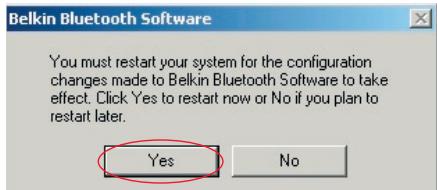
- You will need to restart your PC to finish with the process, press the "YES" button.
If the uninstall application for Windows 98/ME "hangs" and will not continue, press Ctrl + Alt + Delete keys at the same time to bring up the task manager. If the item "Rundll" says "Not Responding" select this item and click "End Task". After doing this, the uninstall process should complete.
The Bluetooth device software has now been removed from your computer.
How to use the Belkin Bluetooth software
- If you have installed the device properly, a Bluetooth icon will have appeared on your desktop.
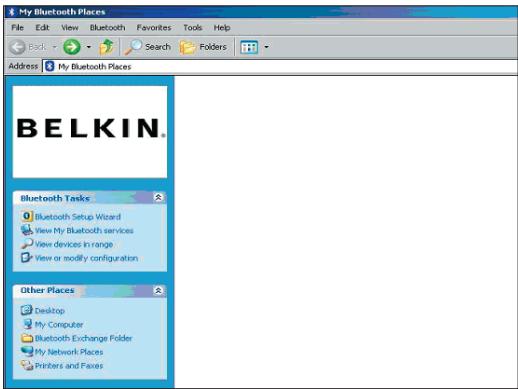
- Double click on the icon "My Bluetooth places"
The following "My Bluetooth places" window will appear:
How to use the Belkin Bluetooth software
- Make sure your phone has Bluetooth capability and the Bluetooth function on your phone is enabled and detectable.
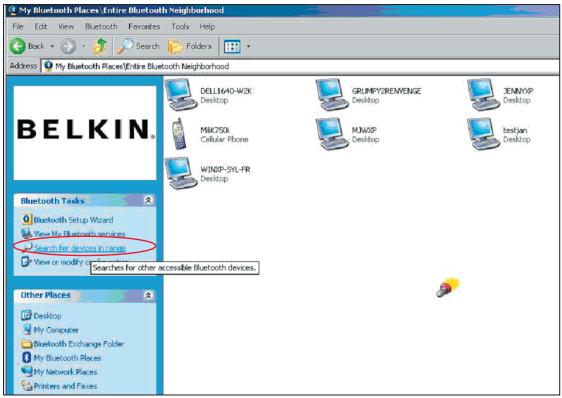
- Click on "View Devices in range" in the menu on the left.
How to use the Belkin Bluetooth software
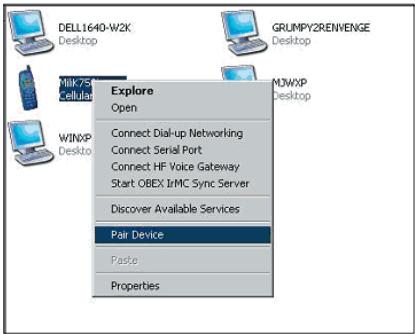
- Once you can see your phone in the list, right click on the icon of the Phone. A menu will appear. Choose "Pair device".
When pairing two devices with numeric input buttons (example: mobile phone, PDA, PC etc.), choose any pin code from 1-10 digits. The pin code must be the same on both devices being paired.
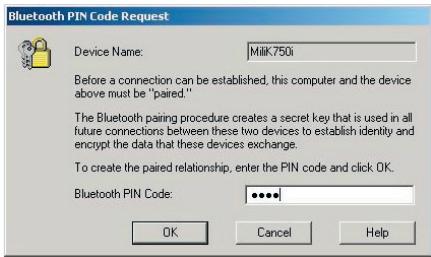
When pairing a device without numeric input buttons (example: headset, car kit), please enter default pin code 0000. The majority of devices will use pin code 0000, however default pin code 1234 is also used in isolated cases.
- Enter '0000' and press OK. In some rare cases you have to enter '1234'.
The next window will appear;
How to use the Belkin Bluetooth software
- Your phone will then ask you to accept the connection, please enter the same pin code in the phone.
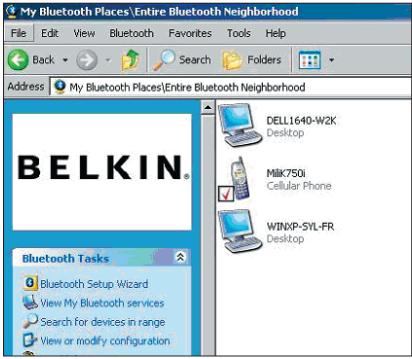
- Once you have entered the pin code on the phone and you accept, the icon of the phone will appear with a red tick as in the image below.
How to use the Belkin Bluetooth software
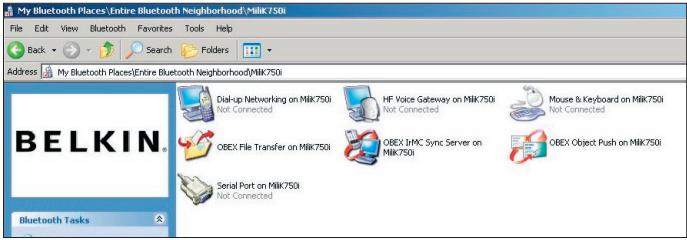
When the phone is paired, you can double-click on the icon of your phone to see the profile service on your phone. You can now start using the Bluetooth profiles.
How to use the Belkin Bluetooth software
Dial Up:
If you want a Dial-up connection, double click on Dial-up Networking and will ask you for a user name, password and telephone number to dial.
Obex File transfer:
Double-click on this service to see the files on your phone. You can copy and paste files from the PC to this folder or from this folder to the PC by right-clicking on the file you wish to copy and pasting into the desired destination folder.
Using third party software
When using third party software, please make sure to configure the software you are using first. You will need to set PC Suite or Active Sync to use the same com port as that which the device is currently using.
How do I know what com port the device is using?
- Go to "My Bluetooth places"
- Go to "View my Bluetooth Service"
- When you see the "Bluetooth serial port" right click on it and select "Properties"
- You will see which com port the Bluetooth device is currently using.
BELKIN
www.belkin.com
Belkin Corporation
501 West Walnut Street,
Compton, CA 90220-5221, USA
+1 310 898 1100
+1 310 898 1111 fax
Belkin Ltd.
Express Business Park, Shipton Way
Rushden NN10 6GL, United Kingdom
+44 (0) 1933 35 2000
+44 (0) 1933 31 2000 fax
Belkin Tech Support
US: 310-898-1100 ext. 2263
800-223-5546 ext. 2263
Europe: 00 800 223 55 460
Australia: 1800 235 546
New Zealand: 0800 235 546
Belkin B.V.
Starparc Building, Boeing Avenue 333
1119 PH Schiphol-Rijk, The Netherlands
+31 (0) 206547300
+31 (0) 20 654 7349 fax
Belkin GmbH
Hanebergstrasse 2
80637 Munich, Germany
+49 (0) 89 143405 0
+49 (0) 89 143405 100 fax
Modulation : GFSK (Gaussian Frequency Shift Keying)
Hardware Installation

The software you are installing has not passed Windows Logo testing to verify its compatibility with Windows XP. (Tell me why this testing is important.)
Continuing your installation of this software may impair or destabilize the correct operation of your system either immediately or in the future. Microsoft strongly recommends that you stop this installation now and contact the hardware vendor for software that has passed Windows Logo testing.
Continue Anyway
STOP Installation
Belkin Corporation
501 West Walnut Street,
Compton, CA 90220-5221, USA
+1 310 898 1100
+1 310 898 1111 fax
Belkin Ltd.
Express Business Park, Shipton Way
Rushden NN10 6GL, Royaume-Uni
+44 (0) 1933 35 2000
+44 (0) 1933 31 2000 Fax
Belkin B.V.
Starparc Building, Boeing Avenue 333
Assistance Technique Belkin
US: 310-898-1100 ext. 2263
800-223-5546 ext. 2263
Europe: 00 800 223 55 460
Australia: 1800 235 546
New Zealand: 0800 235 546
Hardwareinstallation
Hardware Installation

The software you are installing has not passed Windows Logo testing to verify its compatibility with Windows XP. (Tell me why this testing is important.)
Continuing your installation of this software may impair or destabilize the correct operation of your system either immediately or in the future. Microsoft strongly recommends that you stop this installation now and contact the hardware vendor for software that has passed Windows Logo testing.
Continue Anyway
STOP Installation
Belkin Corporation
501 West Walnut Street,
Compton, CA 90220-5221, USA
+13108981100
+1 310 898 1111 fax
Belkin Ltd.
Express Business Park, Shipton Way
Rushden, NN10 6GL, Großbritannien
+44 (0) 1933 35 2000
+44 (0) 1933 31 2000 Fax
Belkin B.V.
Starparc Building Boeing Avenue 333
1119 PH Schiphol-Rijk, Niederlande
+31 (0) 206547300
+31 (0) 20 654 7349 Fax
Belkin GmbH
Werking: Master/Slave
Frequeniestabilitieit: +/- 10PPM
Nominate stroom: 100 mA
Spread Spectrum: FHSS (Frequency Hopping Spread Spectrum)
Modulatie: GFSK (Gaussian Frequency Shift Keying)
Hardware Installation

The software you are installing has not passed Windows Logs Test. This is a compatibility with Windows XP (Tell me why this testing is important).
Continuing your installation of this software may impair or destabilize the correct operation of your system either immediately or in the future. Microsoft strongly recommends that you stop this installation now and contact the hardware vendor for software that has passed Windows Logo testing.
Continue Anyway
STOP Installation
Dial-up (inbelverbinding):
Obex File transfer (Obex-
501 West Walnut Street,
Compton, CA 90220-5221, USA
+1 310 898 1100
+1 310 898 1111 fax
Belkin Ltd.
Express Business Park, Shipton Way
7 Bowen Crescent, West Gosford
NSW 2250, Australia
+61 (0) 24372 8600
+61 (0) 24372 8603 fax
Technische ondersteuning
US: 310-898-1100 ext. 2263
800-223-5546 ext. 2263
Europe: 00 800 223 55 460
Australia: 1800 235 546
New Zealand: 0800 235 546
BELKIN Adaptador USB Bluetooth™
Hardware Installation

The software you are installing has not passed Windows Logo testing to verify its compatibility with Windows XP. (Tell me why this testing is important.)
Continuing your installation of this software may impair or destabilize the correct operation of your system either immediately or in the future. Microsoft strongly recommends that you stop this installation now and contact the hardware vendor for software that has passed Windows Logo testing.
Continue Anyway
STOP Installation
- Cuando vea su téléphone en la lista, hagaWhile you're in the middle of a new year, you'll be able to use your smartphone for free. The following are some ways to use your smartphone: (1) Use the App Store App Store App Store App Store App Store App Store App Store App Store App Store App Store App Store App Store App Store App Store App Store App Store App Store App Store App Store App Store App Store App Store App Store App Store App Store App Store App Store App Store App Store App Store App Store App Store App Store App Store App Store App Store App Store App Store App Store App Store App Store App Store App Store App Store App Store App Store App Store App Store App Store App Store App Purchase App Purchase App Purchase App Purchase App Purchase App Purchase App Purchase App Purchase App Purchase App Purchase App Purchase App Purchase App Purchase App Purchase App Purchase App Purchase App Purchase App Purchase App Purchase App Purchase App Purchase App Purchase App Purchase App Purchase App Purchase App Purchase App Purchase App Purchase App Purchase App Purchase App Purchase App Purchase App Purchase App Purchase App Purchase App Purchase App Purchase App Purchase App Purchase App Purchase App Purchase App Purchase App Purchase App Purchase App Purchase App Purchase App Purchase App Purchase App Purchase App Purchase AppPurchaseAppPurchaseAppPurchaseAppPurchaseAppPurchaseAppPurchaseAppPurchaseAppPurchaseAppPurchaseAppPurchaseAppPurchaseAppPurchaseAppPurchaseAppPurchaseAppPurchaseAppPurchaseAppPurchaseAppPurchaseAppPurchaseAppPurchaseAppPurchaseAppPurchaseAppPurchaseAppPurchaseAppPurchaseAppPurchaseAppPurchaseAppPurchaseAppPurchaseAppPurchaseAppPurchaseAppPurchaseAppPurchaseAppPurchaseAppPurchaseAppPurchaseAppPurchaseAppPurchaseAppPurchaseAppPurchaseAppPurchaseAppPurchaseAppPurchaseAppPurchaseAppPurchaseAppPurchaseAppPurchaseAppPurchaseAppPurchaseAppPurchaseAppPurchaseappurchaseappurchaseappurchaseappurchaseappurchaseappurchaseappurchaseappurchaseappurchaseappurchaseappurchaseappurchaseappurchaseappurchaseappurchaseappurchaseappurchaseappurchaseappurchaseappurchaseappurchaseappurchaseappurchaseappurchaseappurchaseappurchaseappurchaseappurchaseappurchaseappurchaseappurchaseappurchaseappurchaseappurchaseappurchaseappurchaseappurchaseappurchaseappurchaseappurchaseappurchaseappurchaseappurchaseappurchaseappurchaseappurchaseappurchaseappurchaseappurchaseappurchaseapppurchaseappurchaseappurchaseappurchaseappurchaseappurchaseappurchaseappurchaseappurchaseappurchaseappurchaseappurchaseappurchaseappurchaseappurchaseappurchaseappurchaseappurchaseappurchaseappurchaseappurchaseappurchaseappurchaseappurchaseappurchaseappurchaseappurchaseappurchaseappurchaseappurchaseappurchaseappurchaseappurchaseappurchaseappurchaseappurchaseappurchaseappurchaseappurchaseappurchaseappurchaseappurchaseappurchaseappurchaseappurchaseappurchaseappurchaseappurchaseappurchaseappurchaseappurchaseduring the summer months, and during the winter months.
501 West Walnut Street,
Compton, CA 90220-5221, USA
+1 310 898 1100
+1 310 898 1111 fax
Belkin Ltd.
Express Business Park, Shipton Way
7 Bowen Crescent, West Gosford
NSW 2250, Australia
+61 (0) 24372 8600
+61 (0) 2 4372 8603 fax
BELKIN Adattatore USB Bluetooth™
Hardware Installation

The software you are installing has not passed Windows Logo testing to verify its compatibility with Windows XP. (Tell me why this testing is important.)
Continuing your installation of this software may impair or destabilize the correct operation of your system either immediately or in the future. Microsoft strongly recommends that you stop this installation now and contact the hardware vendor for software that has passed Windows Logo testing.
Continue Anyway
STOP Installation
Please turn off or remove your Bluetooth device before continuing with the un-installation.
OK
Cancel
Bluetooth Software

Please wait while Windows configures Bluetooth Software
Time remaining: 34 seconds

Belkin Corporation
501 West Walnut Street,
Compton, CA 90220-5221, USA
+1 310 898 1100
+1 310 898 1111 fax
Belkin Ltd.
Express Business Park, Shipton Way
Rushden NN10 6GL, Regno Unito
+44 (0) 1933 35 2000
+44 (0) 1933 31 2000 fax
Dimensoes: 58mm (C) x 18mm (L) x 8mm (A)
Peso: 7g.
Temp. de funcionaam.: 0 a 70^
Temp. de armazenamento: -30 a 80^
ModULOZA: GFSK (Gaussian Frequency Shift Keying)
Certificacoes: FCC, CE, ICES, C-Tick, BQB, WHQL para XP
Hardware Installation

The software you are installing has not passed Windows Logo testing to verify its compatibility with Windows XP. (Tell me why this testing is important.)
Continuing your installation of this software may impair or destabilize the correct operation of your system either immediately or in the future. Microsoft strongly recommends that you stop this installation now and contact the hardware vendor for software that has passed Windows Logo testing.
Continue Anyway
STOP Installation
Belkin Corporation
501 West Walnut Street,
Compton, CA 90220-5221, USA
+1 310 898 1100
+1 310 898 1111 fax
Belkin Ltd.
Express Business Park, Shipton Way
Rushden NN10 6GL, Reino Unido
+44 (0) 1933 35 2000
+44 (0) 1933 31 2000 fax
Belkin B.V.
Starparc Building, Boeing Avenue 333
1119 PH Schiphol-Rijk, Holanda
+31 (0) 206547300
+31 (0) 20 654 7349 fax
Belkin GmbH
Hanebergstrasse 2
80637 Munique, Alemanha
+49 (0) 89 143405 0
+49 (0) 89 143405 100 fax
Belkin SAS
Hardware Installation

The software you are installing has not passed Windows Logo testing to verify its compatibility with Windows XP. (Tell me why this testing is important.)
Continuing your installation of this software may impair or destabilize the correct operation of your system either immediately or in the future. Microsoft strongly recommends that you stop this installation now and contact the hardware vendor for software that has passed Windows Logo testing.
Continue Anyway
STOP Installation
501 West Walnut Street,
Compton, CA 90220-5221, USA
+13108981100
+1 310 898 1111 fax
Belkin Ltd.
Express Business Park, Shipton Way
Rushden NN10 6GL, Storbritannien
+44 (0) 1933 35 2000
+44 (0) 1933 31 2000 fax
Belkins tekiska support
US: 310-898-1100 ext. 2263
800-223-5546 ext. 2263
Europe: 00 800 223 55 460
Australia: 1800 235 546
New Zealand: 0800 235 546
Belkin B.V.
Starparc Building, Boeing Avenue 333
1119 PH Schiphol-Rijk, Nederländerna
+31 (0) 206547300
+31 (0) 20 654 7349 fax
Belkin GmbH
Hanebergstrasse 2
80637 München, Tyskland
+49 (0) 891434050
+49 (0) 89 143405 100 fax
Spektriytheys: FHSS (Frequency Hopping Spread Spectrum)
Modulaatio: GFSK (Gaussian Frequency Shift Keying)
Sertifikaatit: FCC, CE, ICES, C-Tick, BQB, WHQL XPO:Ile
Hardware Installation

The software you are installing has not passed Windows Logo testing to verify its compatibility with Windows XP. (Tell me why this testing is important.)
Continuing your installation of this software may impair or destabilize the correct operation of your system either immediately or in the future. Microsoft strongly recommends that you stop this installation now and contact the hardware vendor for software that has passed Windows Logo testing.
Continue Anyway
STOP Installation
Belkin Corporation
501 West Walnut Street,
Compton, CA 90220-5221, USA
+1 310 898 1100
+1 310 898 1111 fax
Belkin, Ltd.
Express Business Park, Shipton Way
Rushden NN10 6GL, United Kingdom
+44 (0) 1933 35 2000
+44 (0) 1933 31 2000 faksi
Hardware Installation

The software you are installing has not passed Windows Logo testing to verify its compatibility with Windows XP. (Tell me why this testing is important.)
Continuing your installation of this software may impair or destabilize the correct operation of your system either immediately or in the future. Microsoft strongly recommends that you stop this installation now and contact the hardware vendor for software that has passed Windows Logo testing.
Continue Anyway
STOP Installation
Belkin Corporation
501 West Walnut Street,
Compton, CA 90220-5221, USA
+13108981100
+1 310 898 1111 fax
Belkin, Ltd.
Express Business Park, Shipton Way
Rushden, NN10 6GL, England
+44 (0) 1933 35 2000
+44 (0) 1933 31 2000 fax
Belkin B.V.
Starparc Building • Boeing Avenue 333
1119 PH Schiphol-Rijk, Holland
+31 (0) 206547300
+31 (0) 20 654 7349 fax
Belkin GmbH
Hanebergstrasse 2
80637 Munich, Tyskland
+49 (0) 89 143405 0
+49 (0) 89 143405 100 fax
Tilforselsspenning: 5,0 V likestrøm (DC)
Nominell strm: 100 mA
Spredningsspekter: FHSS (Frequency Hopping Spread Spectrum)
Modulasjon: GFSK (Gaussian Frequency Shift Keying)
Sertifisering: FCC, CE, ICES, C-Tick, BQB, WHQL for XP
Hardware Installation

The software you are installing has not passed Windows Logo testing to verify its compatibility with Windows XP. (Tell me why this testing is important.)
Continuing your installation of this software may impair or destabilize the correct operation of your system either immediately or in the future. Microsoft strongly recommends that you stop this installation now and contact the hardware vendor for software that has passed Windows Logo testing.
Continue Anyway
STOP Installation
Belkin Corporation
501 West Walnut Street,
Compton, CA 90220-5221, USA
+13108981100
+1 310 898 1111 fax
Belkin, Ltd.
Express Business Park, Shipton Way
Rushden NN10 6GL, Storbritannia
+44 (0) 1933 35 2000
+44 (0) 1933 31 2000 telefaks
(F8T012) 4~20 dBm, Class I
(F8T013) -6~4 dBm, Class II
Czulośc:
<0,1% BER @ -80 dBm
Predkosc transmisji:
"Point-to-Multipoint"
Pakiety typu:
1/3/5 przydzielów
czasowych na pakiet
Praca:
Master/Slave
GFSK (Gaussian Frequency Shift Keying)
Certifikaty:
FCC, CE, ICES, C-Tick, BQB, WHQL dla XP
Hardware Installation

The software you are installing has not passed Windows Logs Test. This is a compatibility with Windows XP (Tell me why this testing is important).
Continuing your installation of this software may impair or destabilize the correct operation of your system either immediately or in the future. Microsoft strongly recommends that you stop this installation now and contact the hardware vendor for software that has passed Windows Logo testing.
Continue Anyway
STOP Installation
Belkin Corporation
501 West Walnut Street,
Compton, CA 90220-5221, USA
+1 310 898 1100
+1 310 898 1111 fax
Belkin Ltd.
Express Business Park, Shipton Way
Rushden NN10 6GL, Wielka Brytania
+44 (0) 1933 35 2000
+44 (0) 1933 31 2000 Faks
Modulace: GFSK (Gaussian Frequency Shift Keying)
Certifikaty: FCC, CE, ICES, C-Tick, BQB, WHQL pro XP
Hardware Installation

The software you are installing has not passed Windows Logs Test. This is a compatibility with Windows XP (Tell me why this testing is important).
Continuing your installation of this software may impair or destabilize the correct operation of your system either immediately or in the future. Microsoft strongly recommends that you stop this installation now and contact the hardware vendor for software that has passed Windows Logo testing.
Continue Anyway
STOP Installation
Belkin Corporation
501 West Walnut Street,
Compton, CA 90220-5221, USA
+1 310 898 1100
+1 310 898 1111 fax
Belkin Ltd.
Express Business Park, Shipton Way
Rushden NN10 6GL, Velká Británie
+44 (0) 1933 35 2000
+44 (0) 1933 31 2000 fax
Belkin B.V.
Starparc Building, Boeing Avenue 333
1119 PH Schiphol-Rijk, Nizozemsko
+31 (0) 206547300
+31 (0) 20 654 7349 fax
Belkin GmbH
Hanebergstrasse 2
80637 Mnichov, Nemecko
+49 (0) 89 143405 0
+49 (0) 89 143405 100 fax
Hardware Installation

The software you are installing has not passed Windows Logs Test. This is a compatibility with Windows XP (Tell me why this testing is important).
Continuing your installation of this software may impair or destabilize the correct operation of your system either immediately or in the future. Microsoft strongly recommends that you stop this installation now and contact the hardware vendor for software that has passed Windows Logo testing.
Continue Anyway
STOP Installation
Belkin Corporation
501 West Walnut Street,
Compton, CA 90220-5221, USA
+1 310 898 1100
+1 310 898 1111 fax
Belkin Ltd.
Express Business Park, Shipton Way
Rushden NN10 6GL, Nagy-Britannia
+44 (0) 1933 35 2000
+44 (0) 1933 31 2000 fax
Belkin muzaki tamongatas
US: 310-898-1100 ext. 2263
800-223-5546 ext. 2263
Europe: 00 800 223 55 460
Australia: 1800 235 546
New Zealand: 0800 235 546
Belkin B.V.
Starparc Building, Boeing Avenue 333
1119 PH Schiphol-Rijk, Hollandia
+31 (0) 206547300
+31 (0) 20 654 7349 fax
Belkin GmbH
501 West Walnut Street,
Compton, CA 90220-5221, USA
+13108981100
+1 310 898 1111 fax
Belkin Ltd.
Express Business Park, Shipton Way
Rushden NN10 6GL, United Kingdom
+44 (0) 1933 35 2000
+44 (0) 1933 31 2000 fax
Belkin Tech Support
US: 310-898-1100 ext. 2263
800-223-5546 ext. 2263
Europe: 00 800 223 55 460
Australia: 1800 235 546
New Zealand: 0800 235 546
Belkin B.V.
Starparc Building, Boeing Avenue 333
1119 PH Schiphol-Rijk, The Netherlands
+31 (0) 206547300
+31 (0) 20 654 7349 fax
Belkin GmbH
Hanebergstrasse 2
80637 Munich, Germany
+49 (0) 89 143405 0
+49 (0) 89 143405 100 fax
- Connect your peripherals and computing devices, without cables
- Table of Contents
- Product Features
- PC System Requirements
- Mac® System Requirements
- Package Contents
- USB Adapter Specifications
- Software Setup for Windows 98 SE, Me, 2000, and XP
- Hardware Setup for Windows 98 SE, Me, 2000, and XP
- Hardware Installation
- Configuring your computer for Windows 98 SE, Me, 2000, and XP
- Initial Configuration Wizard
- Uninstalling the Software for Windows 98 SE, Me, 2000, and XP
- Uninstalling the Software
- How to use the Belkin Bluetooth software
- Dial Up:
- Obex File transfer:
- Using third party software
- BELKIN
- Hardwareinstallation
- Dial-up (inbelverbinding):
- Obex File transfer (Obex-
- BELKIN Adaptador USB Bluetooth™
- BELKIN Adattatore USB Bluetooth™
Brand : BELKIN
Model : ADAPTATEUR USB BLUETOOTH™-100 MÈTRES #F8T012FR
Category : Bluetooth Adapter